
What Is Virtual Staging? Cost, Process and How It Compares to Traditional Staging
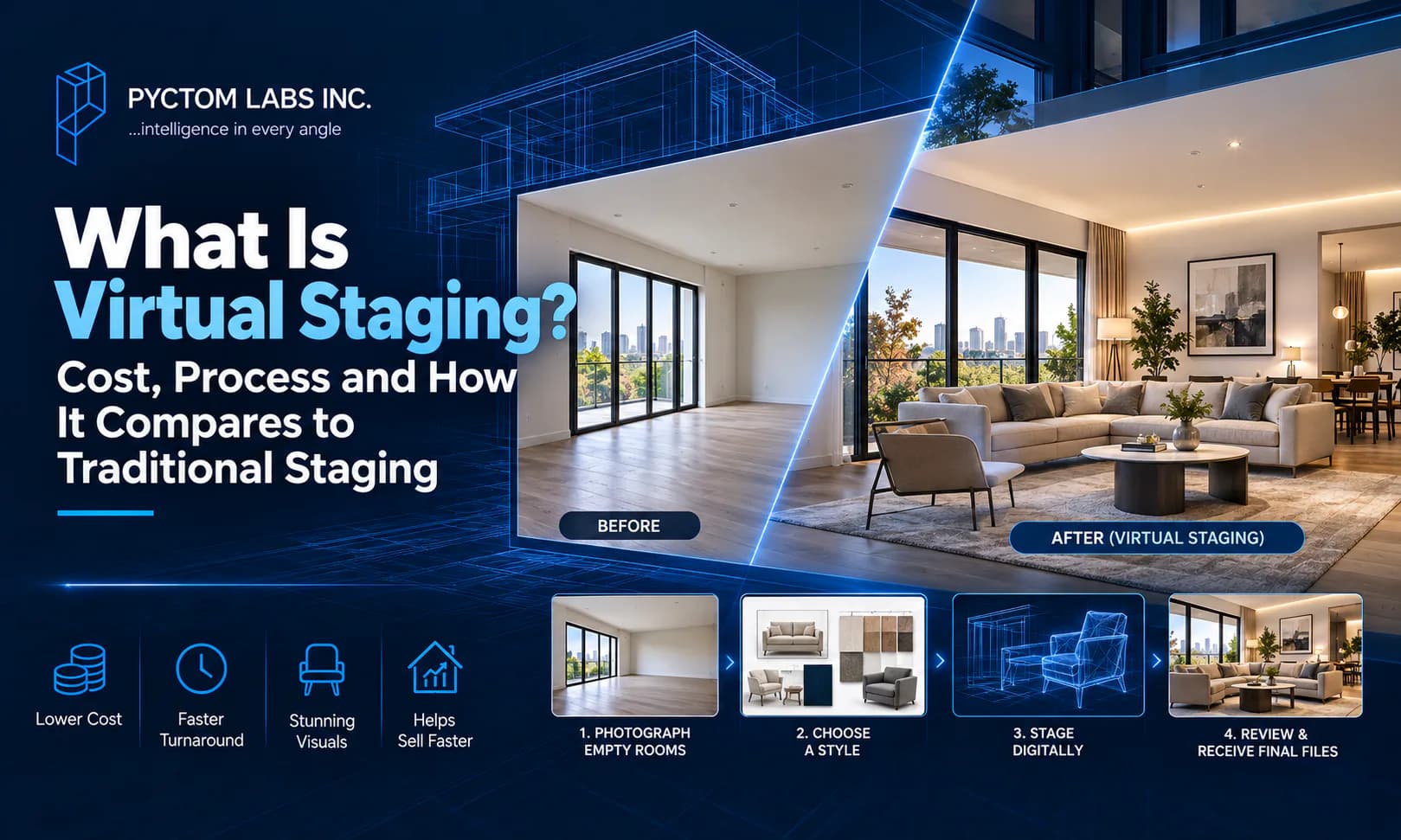
Table of Contents
Virtual staging digitally furnishes photos of an empty home, at a fraction of what physical furniture costs. Empty rooms photograph smaller and colder than they are. Buyers struggle to picture life in them. If you list vacant rooms unstaged, the photos work against your price.
In this guide, we will walk you through what virtual staging is, how it works, and what it costs. We will also cover the one disclosure rule you cannot skip.
What is virtual staging?
Virtual staging is the process of digitally adding realistic furniture, decor and styling to photos of empty or outdated rooms. A photographer shoots the space, and 3D artists furnish it on screen. The result is a listing photo that looks professionally staged, even though no furniture was ever delivered.
When the work is done well, the result is photorealistic. The furniture sits at the correct scale, the shadows fall where the real light comes from, and the reflections look natural. The craft behind it is the same discipline as 3D interior rendering, applied to a photo instead of a model. That is why quality varies so much between providers.
The technique can also do more than add furniture. If a listing is occupied or dated, the existing furniture can be digitally removed before restaging. Virtual renovation goes further still. It can update the flooring, repaint the walls, or modernize a dated kitchen in the image. Buyers then see the home's potential rather than its present condition.
How does virtual staging work?
In four steps: the empty rooms are photographed, a furniture style is chosen, artists stage each photo digitally, and you review and receive the final files. Most projects deliver within one to three business days, with one revision round included.
Our team handles staging end to end, from style selection to final files. Here is what happens at each step.
1. Photograph the empty rooms
High-resolution photos of the space are taken, ideally by a professional. The staging can only be as sharp as the photo underneath. Wide angles at a consistent height work best.
2. Choose a furniture style
You select the look: modern, transitional, Scandinavian, or whatever fits the neighbourhood's buyers. The style should sell the home to its likely buyer, not reflect anyone's personal taste.
3. Stage the rooms digitally
Artists place 3D furniture and decor into each photo. Perspective, scale, lighting and shadows are matched to the room. This is where quality separates, because the furniture rendering must survive full-screen zoom, and buyers do zoom.
4. Review and receive final files
One revision round adjusts styles or swaps pieces. Finals arrive sized for MLS, web and print. Keep the original empty photos too, because you'll need them for disclosure.
How much does virtual staging cost in Canada?
Professional virtual staging costs $50 to $200 per photo, and a whole-home package of 8 to 12 photos runs $400 to $1,500. AI apps charge $5 to $40 per photo, while furnished traditional staging costs $3,000 to $8,000 or more.
Virtual staging is priced per photo, and the economics are what made it standard practice for vacant listings.
| Item | Typical cost (CAD) |
|---|---|
| AI or DIY staging apps, per photo | $5 – $40 |
| Professional virtual staging, per photo | $50 – $200 |
| Whole-home package (8 – 12 photos) | $400 – $1,500 |
| Virtual renovation, per photo | $150 – $400 |
| Traditional staging consultation | $300 – $600 |
| Traditional staging, furnished (1 – 3 months) | $3,000 – $8,000+ |
The comparison is stark. Staging a whole home virtually costs less than one month of furniture rental for a single room. There is no delivery, no damage risk, and nothing to remove when the sale closes.
A word on the AI tier. Apps can now stage a photo in seconds for a few dollars. For a budget listing, that may be enough. For luxury and hero images, professional human staging still earns its price. AI furniture often fails the zoom test on scale, shadows and reflections. Match the tier to the listing, not to the lowest number.
Is virtual staging better than traditional staging?
For vacant homes, online listings and tight budgets, yes. Traditional staging still wins for occupied luxury homes and in-person showings, because virtual furniture exists only in the photos. Many agents now combine both, with virtual staging online and a simple presentation for showings.
Each approach has a job it does best, and the honest answer depends on your listing.
Virtual staging wins for vacant homes, budget-conscious sellers, rentals and pre-construction marketing. It also wins when you want one room shown in two styles. Physical furniture cannot do that affordably. Traditional staging wins for occupied luxury homes and in-person showings. If a buyer fell for the styled photos, they still walk into an empty house. The showing has to survive that contrast.
That is why many agents use both. Virtual staging carries the online listing, where most buyer decisions start. A clean vacant presentation or light physical staging handles the showing.
Which rooms should you stage first?
You don't need to stage every room. The National Association of Realtors' research on home staging shows which rooms count. The living room matters most to buyers, then the primary bedroom and the kitchen. Stage those first. Most buyers' agents say staging helps buyers picture the property as their future home.
Do you have to disclose virtual staging?
Yes. Virtually staged photos must be labelled as virtually staged, and the original unstaged photos should stay available. Most Canadian real estate boards treat undisclosed alteration as a serious problem, so confirm your board's and brokerage's rules before the listing goes live.
Staging may add furniture, but it must never hide reality. If the image removes damage, alters permanent features, or conceals defects, it has crossed from marketing into misrepresentation. Stage the furniture, disclose the staging, and leave the walls and floors as the camera found them.
How do you get professional virtual staging?
Send the empty-room photos to a studio, choose a style for the likely buyer, and ask for a per-photo quote. Pick a provider whose artists render photoreal interiors, because realism comes from rendering skill, not from a furniture library dropped onto a photo.
At Pyctom Labs, staging is produced by the same artists who build photoreal architectural interiors. Every image gets correct light, scale and shadow. For listings with other problems, such as winter exteriors or homes not yet built, our guide to real estate rendering for agents covers the options.
Send us your listing photos for a per-photo quote, and have your staged images back within days.
Frequently asked questions
How much does virtual staging cost?
Professional staging runs $50 to $200 per photo in Canada, and AI apps run $5 to $40. Whole-home packages start around $400, and virtual renovation costs $150 to $400 per photo.
Is virtual staging legal?
Yes, when disclosed. Photos must be labelled as virtually staged, and originals should be available. The images must not hide defects or alter the property's real condition.
How long does virtual staging take?
Most projects deliver in one to three business days from receiving the photos. That is faster than booking one furniture delivery.
Does virtual staging actually help sell homes?
Staged photos help buyers visualize living in the space, which is where online listings win or lose attention. For vacant homes, the alternative is empty rooms that photograph smaller than they are.
Can buyers tell a photo is virtually staged?
With professional work, rarely at listing size, which is exactly why disclosure is required. With cheap work, furniture floats, shadows point the wrong way, and buyers notice immediately.
What's better, virtual or traditional staging?
Virtual wins online, on price, and for vacant homes. Traditional wins in-person showings for occupied luxury properties. Many listings now use virtual for the photos and keep the showing presentation simple.
Disclaimer: The information provided in this blog is for general informational purposes only. For professional assistance and advice, please contact experts.